Wednesday, April 29, 2009

E-tivity 7

Uffa! Respecting referencing conventions (and learning about Google Docs)

Probably the most frustrating, time-consuming activity in finalizing your academic work is respecting the IPR that we discussed in E-tivity 6. Although it may often seem absurd to have to respect 'conventions' for referencing, like the MLA and APA styles that we've looked at, it is a key aspect of respectable academic and professional work, be it digital or paper. Nobody said it was fun, or interesting, but it's something we have to learn. Unfortunately, as much as we may be effective in using social bookmarking and other tools, we often find ourselves ready to complete our text without having correctly dealt with the references. The focus of this week's activity is how to finalize a text with correct references.

Purpose: To work on learning how to reference correctly.

Task: My colleague Francesca Helm and I are currently editing a book and writing chapters for a book on Telecollaboration 2.0. Writing a chapter for a book is much like writing a thesis or dissertation (BTW, it appears you, my students, were right that 'thesis' in America tends to refer to an MA while in Britain it refers to a PhD and for 'dissertation' vice versa). What often happens is that you write, write, write and then you have to 'fix up' the references. I am going to give you an early draft of the Introduction to the book and ask you in groups to check the references using the various online sources we have looked at in class. At the same time, we will learn to use Google Docs - a very useful site to have your documents always online and to share and edit them with peers. As always, if you are in class, you should be able to complete the task in class. Otherwise, complete it online.

1 – Go to Google Docs and make sure you can see the documents I have shared with you: "Hello all" and "E-tivity 7".

2 - I have divided the references part of the text into 8 sources for each group. First correct the referencing based on the APA style. It's useful to have multiple windows open to do this task. You may also have to do some searches on the Internet to find all of the correct information. To do this you can use google advanced search, google books and the other sources we've looked at together. It may not always be easy to find what you're looking for and that's part of the task!

3 - Once you've got the references sorted out, try and find them in the text and correct the in-text citations. Again, it may not be easy but...Use the APA style again.

4 - Write a reflective blogging post on how you think Google Docs could be useful for you and your studies.

N.B. For those of you who used the wiki last semester, I'd just like to point out some differences between a wiki and Google Docs. A wiki is a site with many different pages that anyone can edit. Google Docs is an invite-only service which you can use to privately share documents with peers and colleagues. On a wiki, only one user can edit a page at a time. On Google Docs, more than one user can edit the same page at a time. When you are editing a page at the same time, you should see who is editing it with you. When doing this, once you've entered text, just save and refresh and the new text will appear.

Respond: The usual :-) Overall, you did a great job responding to E-tivity 6!

Timeline: Sunday, May 3 (task), Wednesday, May 6 (respond).

P.S. Once you all have completed the task I will share our final version with you so that you can compare it with yours :-)


Wednesday, April 08, 2009

E-tivity 5: Feedback

Hello all, especially those of you who were not in class on Thursday.
This week, I must admit, I was surprised that many of you wrote you found the e-tivity interesting. As I wrote in the feedback, judging by your expressions in the classroom you all looked utterly bored - so either you lie on your blogs or I can't trust your expressions ;-)

Anyway, I was pleased to see you are developing a critical approach to all of the information you find anywhere. In today's so-called 'information society' or 'knowledge society', critical awareness is very important. I also think you are slowly making improvements in accuracy. Some continue to make 'the same old mistakes', but, indeed, it does take time to get over bad habits so don't get discouraged.

As I said in class, although I only correct two groups' writing each week (due to time constraints), I am certain we all have a lot to learn from each other's mistakes. Indeed, it might be a worthwhile task to critically assess my feedback, make a list of the typical errors and go back and see if you can correct your own blog post!

Finally, last week, Francesca was really the only one who provided detailed linguistic feedback. Her comments were not always 100% correct, but providing linguistic feedback (as I said in class) serves two purposes:
  1. for the person providing the feedback, it requires you to reflect on somebody else's written work;
  2. for the person receiving the feedback, it requires you to decide whether or not you accept your peers' feedback or not.
In other words, we all learn from peer feedback. Therefore, I would encourage you all to make a greater effort in E-tivity 6 to provide one another with peer feedback.

Click here to see feedback for this e-tivity.

I hope you all enjoy your Easter break. I think we are making progress - we just have to keeep on working!

See you on the 29th!

Sarah

E-tivity 6

Respecting IPR and Avoiding Plagiarism

Even before the Web made it possible to easily distribute contents all over the world, laws were developed to respect the rights of people who invent new tools and machines and who create artistic works. These laws can be brought together under the term 'Intellectual Property Rights' (IPR). Not respecting IPR can lead to legal actions.

In academic spheres, similarly, there are un-writtren codes of honor that oblige students and scholars to attribute words, ideas and opinions that are not their own to the original source. Not doing so is called plagiarism. Although not the case in Italy, in many other countries plagiarism can lead to failing a course or being expelled from a University.

Purpose: To understand what we can do to respect IPR and avoid plagiarism.

Task: (N.B. It may look like a lot, but you've got more than two weeks to do it ;-)

1 – On your blogs: What can you do to respect IPR and avoid plagiarism on your blogs? In groups, come up with a list. Search for any websites that discuss the issue and save them in delicious. Make a blog post about what you have learned or feel you still need to better understand.

2 – For your research: If you have not already done so, find an academic article on the Web that you can use for your thesis (see Task in Handout 1).

3 - Complete the Task on the last page of Handout 2.

4 - Start learning about different referencing styles. Explore these two sites that explain the APA and MLA styles that are most commonly used internationally. Based on the research article you found, do the following in both styles:

  • paraphrase a part of the article + in-text citation;
  • summarize a part of the article + in-text citation;
  • choose a direct quotation from the article + in-text citation;
  • write the bibliographic reference that comes at the end of a paper.
Bring your article to class on Thursday, April 30 and we will look at them together. (This is what students have to do in America so now you know how we suffer!)

5 - Write a reflective blogging post on how these two styles differ and how they differ from what you used for your BA thesis. Also comment on any difficulties you encountered.

Respond: Read the other the posts of the members of your group. Write a comment agreeing/disagreeing/reflecting on what your peers have said. Provide linguistic feedback if and when necessary (see Francesca's linguistic feedback to her peers in the .pdf file with corrections from E-tivity 5 - it provides some good examples).

Timeline: Wednesday, April 22 (task - should be 3 blog posts in all, points 1, 3 and 5 above), Wednesday, April 29 (respond to one of all of the 3 posts - your choice!).


Wednesday, April 01, 2009

E-tivity 4: Feedback

SIMPLY… DELICIOUS!!!

Surprise, surprise!...Bookmarking is so delicious...

What a del.icio.us discovery!

Social Bookmarking is DELICIOUS!

"Delicious-ly" bookmarking!

Your blog post titles say it all :-) Undoubtedly the name of the tool lends itself to creative title-making ;-)

You all have clearly explored delicious and discovered many of the ways in which it can truly be a useful tool. From reading your posts, what’s most important is you’ve understood the ‘social’ aspect. It’s also good that you’re finding new ways the Web can help you improve your English. Speaking of which…as language students you are, obviously, still making minor errors in your written expression. You should feel comforted by the fact that you make similar mistakes ;-) It’s also always good to make a list that can become sort of a checklist of things to go through before posting a post. One that might come out of these posts is:

- Relative clauses
- Sentence order and structure
- Paragraphing and paragraph length
- Punctuation (especially with subordinators and conjuncts!)

All things considered, though, you all express yourselves clearly and use appropriate words. Well done.

Regarding comments, those I read were supportive and friendly and clearly indicated you are reading one another. The next step is to make a second comment in which you provide each other with linguistic feedback. Good luck!

Sarah

P.S. Three people put the –s on adjectives!!!

Click here to download my feedback to groups 3 and 7.

For some tips on how to give effective feedback, click here and here.

Criteria we came up with in class

Collective Intelligence

Why was the information provided?
if you are an academic or researcher
online journals pay-access only
open access online journals

Author
who is the author?
is it an author who is known in the community?
if not, could he/she be considered authoritative? (e.g. a dissertation)
shouldn't be written by a no-one
part of a network?

The website
what's the domain? (if it's on the Web)
do cross-referencing - same info or opinions in other websites? cited in other places?
graphics - layout, e.g. a lot of emoticons? a lot advertisements?
is the "knowledge" protected by some kind of license, material copyrighted? or creative commons?
how many times has the site been visited?
who is responsible for the website and the content?

The contents
is the contente reliable? external references? useful links? use of paragraphs, etc?
when was the information published? is there something more recent or is this still the authority?


words we've excluded from our vocabulary: DON'T HAVE TO BE MUSTN'T
alternatives, SHOULDN'T, ARE NOT SUPPOSED TO, CAN'T, IMPERATIVE

Tuesday, March 31, 2009

E-tivity 5

Evaluating Online Sources

Read this comment by a teacher to a blog post by Lawrence Lessig (mind you, blog, not website) responding to Andrew Keen's book "The Cult of the Amateur", which criticizes user-produced content on Web 2.0, at the cost of what he calls 'expert knowledge'. Lawerence Lessig is a law professor at Stanford University and the founder of Creative Commons.

"I find the most interesting aspect of these phenomena (be it Wikipedia or blogging or YouTube or Amazon recommendations) is the way that they force [u]s to recognize that the established mechanisms and institutions of information and culture (be it Encyclopedia Brittannica or The Wall Street Journal or NBC or Consumer Reports) are themselves socially produced, historically contingent, institutionally bound, and systematically imperfect systems. They too have an implicit, built-in philosophy of where knowledge and culture come from and how one knows to trust or appreciate it, they too are structurally better at getting at some things and worse at others, they too can be mishandled or exploited. This is not to say that we should adopt a relativist position, that any way of producing information is okey-dokey. We can have a discussion about specific kinds of resources are best served by particular arrangements, some of which may benefit from wider, amateur participation, others benefiting from more bound, trained communities. But it obligates us to give up this kind of comfortable certainty we enjoy about those traditional forms, the social authority they have built up over time that cloaks their imperfections. And just as much as the Internet and its applications may be highlighting this, the traditional institutions of knowledge are doing a fine job revealing their own weaknesses all by themselves, from the failure of the political press to challenge the run up to war in Iraq, to the diminishing cultural relevance of major label music, to the crushing consolidation of corporate radio , etc etc."

All this to say, that what we consider when evaluating online sources of information is just as valid when we are evaluating print or 'traditional' sources of information.

Purpose: To reflect on and discuss what criteria you do use and can be used to evaluate the reliability and authority of information you find on the Internet (or anywhere!).

Task:

1 – Many of you will be writing your theses soon and there’s no doubt that you will be using the Internet as part of your research. Whenever you do research, be it in the library or online, you have to judge the information you come across. I’d like you to think about what criteria you use to make these judegments. Make some notes about this either on paper or in your blog. If you do this in class, make a list in groups of 3-4.

2 – Go take a look at suggestions other universities make for students. Go to the websites listed below and see what they say. Do you agree? Disagree? Have they pointed things out you had not thought of? Feel free, of course, to do your own searches too ;-)

Tips from the University of Essex

Tips from Purdue’s Online Writing Lab (OWL)

Tips from San Diego State University

3 – Make a checklist that you can always keep handy when searching for information.

4 - Based on your checklist, let's go explore some MORE tools you can use to 'filter' information on the Internet. Search for the phrase "personal learning environment" in the following websites. Find sources that you think are valuable and save them on delicious (in class, again, do this in groups).

  • Google Blogs - Similar to Technorati, Google will search for your tags in blogs on the Internet
  • Google Books - Various publishers have published parts of books on the Web. Although you cannot download or copy the information, if a book is not in the library and you're thinking of buying it, or if you want to check it out before you go to the library, you can use this tool to read bits and pieces of a book.
  • Google Scholar - Going one step further, with this tool, Google will search for your tags in online academic texts, be they .pdf files, .docs, abstracts or citations. You may find paid-access only sites, but you may also be surprised by how many free online texts are available on the Web.

    DOAJ - Directory of Open Access Journals

    And the good old library catalogue

And if that wasn't enough ;-) What about wikis? In his book, "The Cult of the Amateur" Andrew Keen' states "Since Wikipedia's birth, more than fifteen thousand contributors have created nearly three million entries in over a hundred different languages—none of them edited or vetted for accuracy (p4)." Well, not all wikis are Wikipedia. See what you think of these:

The E-language wiki

The LTC wiki at the University of Manitoba

5 - Write a reflective blogging post on what, if anything ;-) , you have learned in this task.

Respond: Read the other the posts of the members of your group. Write a comment agreeing/disagreeing/reflecting on what your peers have said.

Timeline: Sunday, April 5 (task), Wednesday, April 8 (respond).

Thursday, March 26, 2009

Dashes and so

During class today, a bit of confusion came up regarding how to use dashes and the word 'so'.

Dash
I never use them, but this doesn't mean they aren't used. This site confirms what you said Scott told you about dashes giving importance to words. This one says something a bit different. This one looks a lot better and I like the WikiHow site :-)

So
No definitive conclusions yet, but besides being an informal version of 'therefore', 'so' is a coordinating conjunction, meaning it connects two words, phrases or clauses, whereas 'therefore' is an adverb and links independent clauses.
Therefore ;-) 'therefore' is preceded by a semi-colon and followed by a comma and 'so' should not have any punctuation even though you will often find it preceded by a comma.

Sarah

Feedback e-tivity 3

Hello all,

This week I corrected the blog posts of those who posted e-tivity 3 by the deadline. We discussed them a bit in class, but you can see a .pdf with the corrections on the wiki. I would suggest you ALL read ALL of my corrections as I feel we all have something to learn from each other's mistakes.

You did a good job of eliminating what we said we'd eliminate, e.g. present perfect, also, such, must, etc., and today in class we decided to eliminate 'don't have to' as well. I think these posts are an improvement on the first ones and I'm sure as you learn to blog and simplify, they'll get even better.

Next week I will be correcting the the posts and comments of two of the groups :-)

Sarah

Speaking of RSS...

It appears UniPD is not the only institutional website that does not use RSS. The Open University - Britain's first and best distance learning university - doesn't either! Go here to read about why some think it should.

Monday, March 23, 2009

E-tivity 4

Social Bookmarking

So far in this course we have seen how blogs can be a useful way of 'filtering' the overload of information on the Internet and how you can use feeds to help manage that information. This week we are going to explore another tool that can help you effectively use the Internet for your learning and searches: social bookmarking.
Social bookmarking is a way to store and share your favorite websites and blogs online instead of on your computer, which is good for those of us who use different computers. “Bookmarking” because it’s a way to always find your way back to that great webs
ite you found. “Social” because not only are you sharing your bookmarks with a community of people, but they are sharing theirs with you; this gives you access to searches other people, with your same interests, have already done to find great websites. We’re going to use social bookmarking to build up a repository of useful websites for all of you in your English language learning, tapping into each other’s resources.

Sarah

Purpose: To start social bookmarking and in doing so, search the Web and del.icio.us for websites of interest to us all (read, read, read), evaluate them and summarize them (write).

Task: (If you were in class, presumably you've done all the tasks except maybe finding all 5 bookmarks).
1 – Watch this explanatory video by CommonCraft- I'm subscribed to their feed so you may want to too :-)
2 - Explore. Go to del.icio.us and explore. Click around to get an idea of what the website i
s all about.

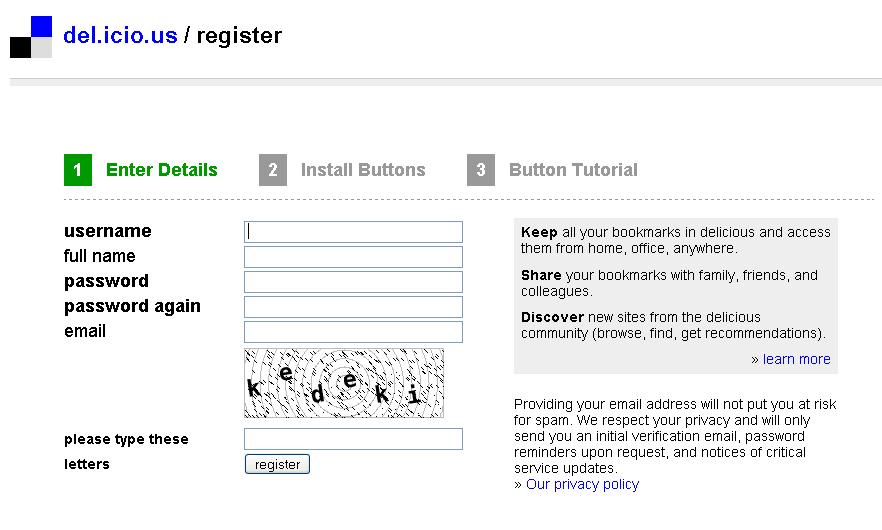
3 – Log in. You will have to register, as usual, to use del.icio.us (obviously it’s free!), though I'm confident you're experts by now! Click on “register” and proceed using your bloggingenglish username. The second step involves installing easy-to-use buttons on your computer; you can do this on your computer at home if you like, but we will not be using them in the language lab. In any case, then go to the top of the page and on the left-hand side you should see "your favorites". Click there and you should see a pop-up window telling you that a verification email has been sent to your email address. Go check your email and click on the link del.icio.us sends you. Once you've done that, you're ready to go!

4 – Search for websites and blogs that might interest you and your peers by typing key words in the tag box. They should be words that involve language learning or other subject matters you study and, this time, not personal interests. For example, in this course you might be interested in English, learning, listening, writing, blogging, etc. If you come up with too many bookmarks, narrow your search by adding more words. Scan the bookmarks that come up and go and visit the ones that interest you. Choose 5 that you think may be of interest to you or your classmates. (If you found blogs of interest to everyone, feel free to use those - or even see if you find them on del.icio.us!)
For curiosity's sake, look for the tags bloggingenglish1, bloggingenglish2 and bloggingenglish to see what your peers came up with last semester - some very interesting sites!

5 – Post your new bookmarks (You can watch this tutorial I made last year about posting on del.icio.us). At the top of the page, click on “post”. Then you will see a frame like the one here.

url: (self-explanatory)
description: this is like the title, what other people will see. It can be the title of the website or a summary-title that you make up.
notes: Make a 2-5 short sentences summing up the website in such a way as to attract attention. Do NOT cut and paste information from the site; use your own words.
tags: These are words that describe the site. Among the other tags you choose, always write bloggingenglish_09. That way we’ll always have a way to find our course bookmarks.

6 - Make a network for the members in your group. First send a comment to your group mails on the course blog (see blogroll) where you sent the comment with the url of your personal blog indicating the username you have on del.icio.us. Then go back on to del.icio.us and click on "your network" on the top left-hand menu and then using the "add" box on the right -hand long menu to add the members of your group (and me if you want) to your network.

7- In preparation for next week's lesson, please read this article from the NY Times. I have also added it to delicious with the bookmarks "bloggingenglish_09" and "ipr", which stands for "intellectual property rights". Feel free to comment on this article too ;-)

P.S. I just found these two articles on the NY Times and Repubblica - same story, news a bit different. Check it out.

Respond: Choose 1 bookmark from each of your classmate’s 5 bookmarks based on the description in “notes” (find them by using the network you created) and go visit it. Write a post in your personal blog about your impressions of social bookmarking and your classmates’ choices.

Timeline: Sunday, March 29 (task), Wednesday, April 1 (respond).

N.B. As always, write comments to this post if you've got problems or difficulties.

A little slap on the hand

Hello all,

I've been monitoring your blogging (through Bloglines!) and as of today, 10 out of 24 students have not completed the task part of the e-tivity. Only 1 group (Group 3) has the posts on RSS feeds from all its members and can, therefore, move on the the respond part of the e-tivity. So before things get out of control, let me establish a few rules.

1 - If you decide to attend this course, you have to do the e-tivities. Blogging is about creating communities and communities are only created if members participate. Like some of my past students, you may eventually create your own community, but when you first start blogging it's important to have readers and that's what you all are for one another.

2 - Complete the task part by the deadline so you will have time to do the respond part as well. If you have difficulties, write a comment to your peers' blogs letting them know.

3 - Write something interesting, and write well ;-)

If you feel you are not up to this, let me know. I don't think I'm asking too much of you, but, again, let me know if you think I am.

See you on Wednesday for another technological adventure :-)

Sarah

Wednesday, March 18, 2009

E-tivity 3

By now, if you were in class, you should have your aggregator up and running. The next step is to build up resources on your aggregator. Your feed aggregator can be a very useful resource and help you learn to use the Web in a more time-effective and efficient way.

Purpose: To start using your feed aggregator, to start building up resources on your aggregator and to reflect on what you're doing.

Task: Using the bloglines account you created in class:

1- subscribe to all of the personal blogs in your group (if you haven't already done so);

2 - search for other useful sites that have feeds, e.g. online newspapers in English, and subscribe to them;

3 - create playlists for your group (if you haven't already done so) and for your other resources, e.g. online newspapers, blogs, etc..

4 - write a post on your personal blog giving your impressions of your new experience with feeds and feed aggregators.

Respond: Go to each other’s blogs (using bloglines!) and read your peers’ reactions. Comment on the blogs of the peers in your group. Read carefully: this time I would like you to provide linguistic feedback as well.

Timeline: Sunday, March 22 (task), Wednesday, March 25 (respond).

As alwyas, if you've got questions or doubts, don't hesitate to write a comment to this post with it!

N.B. When working on any computer that is not your personal computer, always remember to LOG OUT BEFORE YOU CLOSE BLOGLINES.

In class on Thursday, March 19

Feeds

Imagine that there are several websites and blogs you want to keep track of because they are regularly updated with interesting information (e.g. your peers' blogs). Traditional approaches include bookmarking each site on your pc, linking them to your blog, or writing down the urls on a piece of paper and then visiting them on a regular basis to see if there are updates. They may or may not offer new items each time you check.
Wouldn't it be much better to use just one technology that would visit all of these websites for you, collect any new information posted there each day, and then aggregate that information for you in one easy-to-read spot? That is the gist of what a news aggregator does. "While the technology that makes this all work is on the complex side, the actual implementation and use of RSS and aggregators is actually very easy” (Bell).
Have you ever noticed that on many of the websites you visit (even on your blog) there’s a little orange box or a few little orange boxes under the title ‘Syndication’ like these:

If you have, have you ever wondered what they mean? Let’s start with RSS. This acronym stands for ‘Really Simple Syndication’. What is ‘Syndication’ then? News agencies produce a flow of news organized based on a common structure: a title, the body of news, the date and hour and, sometimes, the author and subject. The publications that subscribe to a given agency can publish the news they receive from the agency in any format they chose. RSS, and the other formats you see in the image (XML RSD and XML ATOM) are the Web incarnation of the same concept. In other words, websites where information is updated on a regular basis, e.g. newspapers and blogs, offer users the possibility to subscribe to the site. RSS and XML are languages used to transfer the information on a site in a standard format, often free of images and other multi-media content and formatting. Each time the site is updated with new information, subscribers receive the update.

How then does one subscribe to an RSS feed? To do this you need an aggregator. Some aggregators can be installed on your computer (e.g. Sage by Mozilla) while others are websites you can access via any web browser (e.g. Bloglines) – most are free. You download or register for an aggregator and then you can subscribe to various RSS feeds. When new information is added to the sites you’ve subscribed to, depending on the options you’ve chosen or that are offered by the website with the feed, you will receive a summary or complete text version of the new information.

This week we’re going to play around with feeds.

Sarah


Task:
1 – Create an account in Bloglines. (If you weren't in the lab and would like to be guided through the process, check out the video at the bottom of the message.)

2 – Subscribe. Open two windows. In one open your bloglines account, in the other our course blog. First subscribe to all of your peers’ personal blogs (use the other bloglines tutorial if you weren’t in class). You have to subscribe to the blogs of peers in your group and are welcome to subscribe to all the other ones as well. Then explore the Web, e.g. the blogs you found in e-tivity 2, and see if there are other websites you may want to subscribe to, e.g. online newspapers.

3 – Create playlists. Playlists are another nice way to organize information and a good way for you to organize work in this course. Make a playlist for the blogs in your group. You can also make playlists for the other groups as well as other categories such as newspapers, Listening online, etc..

Bell, Steven. Using An "Aggregator" To Capture RSS Feeds: A Technology For Keeping Up-To-Date. Retrieved November 17, 2006 from http://staff.philau.edu/BellS/rss.htm

Registering for Bloglines Tutorial
Subscribing to Feeds Tutorial

Thursday, March 19

I have been able to find a lab for us to use tomorrow, Thursday March 19th as there's an important task I would like to do with you using the computers.

So, we will meet in the new lab at the Centro Linguistico. It is in via Martiri della Libertà, numero 2. I've never been there, but the secretary tells me "in pratica un po' più avanti rispetto a dov'è il CLA, dove ci sono le scale esterne di entrata; una volta entrata, il laboratorio è subito sulla sinistra dopo la guardiola."

The technician can't arrive until 8.45 so for the first group I'll meet you outside at 8.40.

Hope you all see this message - pass the word around.

Thanks and see you tomorrow.

Sarah

Monday, March 16, 2009

CVs

Hello all,

For what it's worth, you may want some tips on how to write a good CV or Resumé.
1 - open google
2 - advanced search
3 - write something like "good CV" or "good resume"
4 - choose the domain: .ac.uk for "CV" and .edu for "resume"
You should find some good tips.
Maybe add some links to your blog or as a comment to this message if you find a good source.

Sarah

No class on Wednesday

A strike for the entire education sector has been called for March 18, 2009. Together with many other colleagues, I feel the reform proposed by the present government will only harm this sector. Clearly reforms need to be made, but not this way. Therefore, I will be participating in the strike on Wednesday and will not be teaching.

I am currently looking for a lab for us on Thursday because there's something I really wanted to do with everyone this week. Please check this blog before Thursday to see if I have found a room and, if I have, we will be meeting elsewhere.

Sarah

Read more on the Italian newspapers:
Repubblica

Wednesday, March 11, 2009

E-tivity 1 : Feedback

After each e-tivity, I will try and provide you with some feedback on my observations of how you managed to do the task. Sometimes, like this week, I will focus on content, other times on language. So this week it's...


Feedback in your words ;-)


Below I’ve categorized your reactions to e-tivity 1 by using your own words. Let’s see.


You felt overwhelmed

  • It took me some (quite a lot, I must say) time to get used to the logic of blogs, posts and whatever.
  • Only after surfing the web for an hour I found out an interesting blog about movies.
  • I started to search for a blog from Technorati and I must say that I was disoriented: the blogosphere is so huge that I had difficulties finding what I was looking for.
  • I had never realized how huge is the blogsphere.
  • This has been my very first experience with blogs and I must admit that I have found myself a little bit confused. The reason is that there is a huge amount of blogs but only some of them are interesting while some others aren’t at all.
  • I've been surfing the web for two or three hours I guess
Some showed a bit of enthusiasm
  • So, what can I say about my first experience in the blogosphere? To be honest, it was confusing. The fact is, I wasn't able to focus on one topic, there are so many blogs that I was curious to read a little bit of everything!
  • I wasn’t familiar with blogs…I’d never written a post before our last lesson! I spent some time surfing on the Internet and I found many interesting things!
  • I think that using the proper tools (e.g. Technorati) one can find a lot of interesting and authoritative blogs. Many blogs offer technical and reliable informanion through a plain and readable style, which is useful especially for those who are not practised in a certain matter, but want to know about it!
And you made many insightful observations about the language used in blogs?
  • Blogs are mainly an informal way of communication, similar to oral conversation. People blogging are not concerned with language accuracy, but with communicative purposes.
  • besides being a little weird, I found that her language is very fresh and spontaneous, as well as a blog language should be, since it is created in the very moment it is spoken/written/thought.
  • It is written in a very spontaneous and witty way. There is a huge load of idiomatic expressions and everyday ways of saying. Sometimes the language tends to be a little foul-mouthed, but that's the style of the writer. The comments are mainly written by the fans and they are written in a very spoken style with the add of smileys and other internet stuffs!
  • The blogs I looked at were written in a plain style, using contracted forms, abbreviations (such as lol, afaik, asap, cul8r etc...) and emoticons. The latter are very important: since netspeak lacks facial expressions and gesture, smileys can forestall a gross misperception of a speaker’s intent. Generally speaking, I can say that blogs are written in an informal style and the writers do not care about accuracy (for example, most of the people write the first personal pronoun without the capital letter).
  • the blog has both a formal and informal language style, depending on the purpose of the message: quoting, comments, reviews.
  • If you are also interested on reading a blog written in a formal style, here a good example of writing, that aims to distinguish itself and also its readers and writers.
  • The linguistic style of the posts is quite formal, even if the use of the first person makes you feel closer to the writer. It is like reading someone else's diary.
    The comments are however much more informal and colloquial.

You noticed how the language used tells us something about the community of bloggers surrounding a given blog
  • The language used is very informal and simple. The bloggers are all 'on the same level', they are young people who share an interest, and this permits them to be completely relaxed and feel free to write whatever they want. Some comments even contain insults and bad words to express disagreement on someone else's post, but I think it's fine: in informal contexts we all talk like that, so why shouldn't we be ourselves on the blogsphere?
  • Unlike the majority of blog that are based exclusively on simple language, this site also includes technical words, and goes into details when for example they talk about photos and cameras. This helps us to understand that the all the bloggers share the same interest and knowledge of the topic.
  • I think that the author of this blog is an artist and knows very well the topic he is writing about. The bloggers who make comments are less qualified, but equally involved in the topic. They use the links to advert to their own blog; while the author uses the links to give more information or post the blogs of his friends.
And, finally, you found some common characteristics of blogs
  • Blogs are written in a simple way for they want to attract as much readers as possible but also because they reflect the oral interaction between persons.
  • The links I found in the posts have the aim to develop some themes that the reader couldn’t know and in this way he could deepen them. The link are related both to other web-sites and to other posts of the blog.
  • you can find extended links at the end of each post, with the aim of getting the possibility to find out more information about the topic discussed in the post. But you can also find links in the form of underlined and clickable words (they are links to external web pages).
  • I like this blog because I think it is well organized, it is full of external links to other blogs or websites and it is possible to watch movie trailers directly from the posts. Moreover, every post has some tags so that you can easily find what you're looking for. It is also possible to subscribe to RSS or to receive updates by Email.
You may be happy to know that you're not the only ones who felt this way. Go see what your peers last year wrote. Click here.

Monday, March 09, 2009

Blogging Groups

Hello all,

From today on, many of your tasks will be done in groups. I have divided you into groups according to your Thursday lessons, but besides that randomly. Tomorrow in class you will have to come up with a name for your group so start thinking about it :-)

Sarah

Group 1
Crema Arianna
Crepaldi Martina
Deon chiara
Grotto Ilaria

Group 2
Kosic Zvjezdana (Stella)
Maniero Francesca
Martellozzo Francesca
Migliorini Elena

Group 3
Persegona Cristina
Verotti Michela
Zambolin Elisabetta
Bertelli Anna

Group 4
di Gioia Serena
Bianchi Chiarani Mario
Bonomi Federica

Group 5
Bortolamedi Valentina
Bullo Francesca
Campagnolo Giorgia
Zorzi Serena

Group 6
Faggian Anna
Colombo Sarah
De Polo Elisa
Faggioni Maria Francesca

Group 7
Marabiso Sara
Simioni Anna
Tolfo Valentina

E-tivity 2

Blogging

Hopefully you all were in class and have got your blogs up and running. The biggest challenge with blogging, all the literature shows, is trying to update your blog on a regular basis. During this course that won't be a problem as you'll have weekly tasks to do that I give you ;-) Your blog is going to be your personal learning environment. One aspect of this, at least during the course, is going to be what I call 'reflective blogging' which entails reflecting on your learning process through blogging.

Last week, during the Thursday lessons, you all wrote down your "next language learning targets" that I then photocopied and will give back to you. This week, we're going to explore how you can use your blog to achieve the learning target.

Sarah

Purpose: To start reflective blogging.

Task: Write a reflective blogging post that includes:

1 - a concise summary of it in a blog post, including how much time you will devote to achieving it;

2 - if anything you've found so far on the blogosphere might help you achieve that target, if so, what, if not, what do you need to look for;

3 - an honest account of whether or not, in the past week, you have done anything you wrote on your learning target sheet!

N.B. Make sure you sign your post and be concise ;-)

Respond: I have placed you in groups (see next post) that you will 'blog with' over the next 8 weeks. Go to the blogs of the other members of your group. Read their posts, take a look at their blogs. Leave a comment on one or more of the posts in each member's blog.

Timeline: Sunday, March 15 (task), Wednesday, March 18(respond).

Class Activity March 11

Developing your own blog

Now that you’ve started exploring the blogosphere and seen other people’s blogs, it’s time for you to become a blogger yourself and develop your own blog. In their comments on blogs, two students last year made the following comments: Francesca said “it is like a work of art: it expresses your personality" and Tania commented, bloggers "want to express their personal opinions and catch other readers' attention." This week it’s time for you to express your creativity and personality, to find your own style, and to figure out how to catch other bloggers' attention.

Task: Log on to blogger and rather than clicking on our course blog, develop your own. You have the freedom to do whatever you want. Choose a style, change the colors, add some links and some images or pictures, etc. Please include: 1 - a welcome message, 2 – a post in which you critically reflect on your first experience with blogging (e.g. what are your impressions) and if and in what way you think it can influence your language learning (e.g. reading colloquial English).

Write a comment back to this post in which you share the url of your new blog with the rest of us.

A student from last year's course wanted me to share this email with you that she wrote to me last week: "you know, I'm still blogging, even if without your tasks it is a bit difficult to write every week. The american Blogger friend camu i Italy once more, and that was an occasion to meet another blogger, a professor at the University in Genova. Tell your students that there are many interesting person you can meet with this kind of tools!"

Let's get to work!


Sarah

N.B. If you weren't in class, then you need to do this on your own. If you're having difficulties, check out this tutorial on YouTube. If you type in the words "blogger tutorial" in YouTube you can find other tutorials on how to do various things with blogger.